


Wodfix Ultra+
4.864.00 Reviews
App Specs
- Version
- 1.0.5
- Updated On
- License
- Free
- Downloads
- 50,000+
- Developer
- Vertex Digital Entertainment
- Categories
- Entertainment
- Platform
- Android
Screenshots
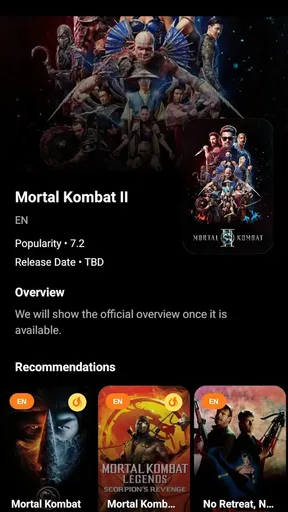
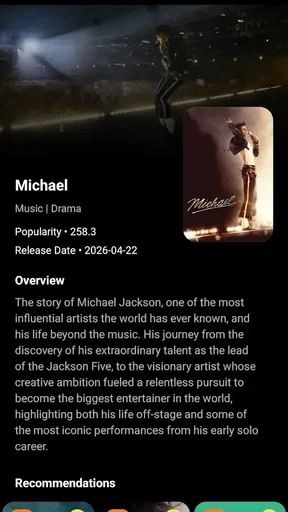
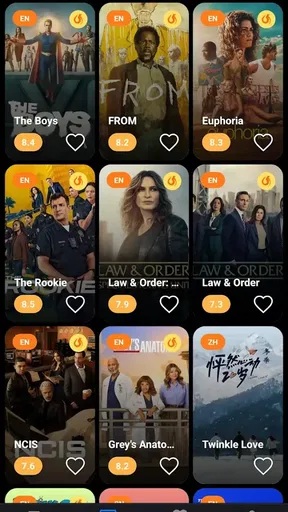
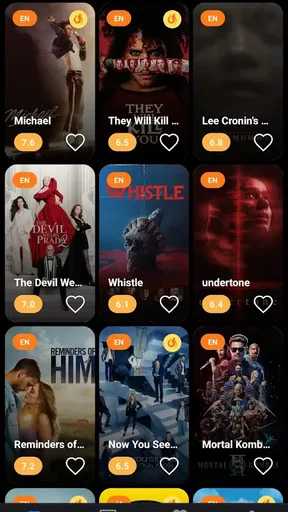


 Analysis by AppCompare
When several people in a household take turns choosing what to watch, the search can become longer than the movie night itself. I use Wodfix Ultra+ as a place to look up movies and TV shows and get more detail before the group settles on a pick. Its value is in helping everyone compare possibilities, rather than asking one person to rely on memory or bounce between scattered searches.
A shared screen-time decision, with less guesswork
A useful household routine is to search while people are still deciding what kind of evening they want. One person may have a title in mind; another may only know they want a light comedy or a long-running series. Browsing a broad catalogue of titles gives the conversation somewhere concrete to go, and detailed information can help the group decide whether a candidate sounds suitable before anyone commits to it.
That makes the app most useful at the discovery stage. I would treat it as a reference for exploring titles and comparing details, not assume it replaces a streaming service or provides the movie itself. If your main goal is to press play immediately, a service that already carries your subscriptions is the more direct choice. If the problem is figuring out what to watch, this kind of catalogue search has a clearer role.
Set expectations before sharing a device
On a shared phone or tablet, the simplest boundary is to agree on who is searching and what the group is trying to find. That sounds basic, but it keeps a casual browsing session from turning into an endless scroll through unrelated ideas. I’d start with a short list of names or a specific mood, then use the app to inspect likely matches rather than treating every result as a new invitation to browse.
One practical tip is to keep a note of titles the household wants to revisit, rather than expecting everyone to remember what they saw during a quick search. The app is useful for looking things up, but a family’s separate watchlist or shared note can be a better coordination tool if several people browse at different times. This small division of labor matters: use the catalogue to investigate, and use a shared place everyone can access to preserve the final shortlist.
Coordinate the choice, not just the search
For a realistic weeknight example, imagine that one person has ten minutes before dinner and another is joining later. The first can search a few familiar titles and note the options; when everyone is together, the group can compare the details and make a quicker decision. This works better than handing the device around without a plan, especially when tastes differ or someone has already watched the obvious pick.
There is a trade-off, though. A detailed catalogue can make discovery more informed, but it cannot settle disagreements about genre, mood, or how much time people have. I’d use it to narrow the choices to a manageable handful, then let the group make the final call. If you need shared profiles, synchronized lists, or household scheduling, choose a service specifically built around those functions instead of expecting a title-reference app to manage the whole evening.
Worth Reading Before You Choose

Flipboard Shows What News Apps Must Do Beyond the Feed

Switching to Android Auto Means Rethinking Your Driving Routine

Google Calendar Makes a Crowded Week Easier to Manage

Ludo King Makes the Most of the Minutes Between Plans

Baby Panda World Brings Quick Play to Modern Phones, but Its Game Library Feels Busy

ESPN’s Live Game View Makes Following Close Games Easier
What Makes Wodfix Ultra+ Stand Out?
First off, the user interface is super intuitive. You know how some apps just feel clunky? Not this one. Wodfix Ultra+ welcomes you with a sleek design that’s easy to navigate. Even if you’re not a tech wizard, you’ll find your way around without a hitch.
Now, let’s talk about the features. This app is packed with a variety of workouts and training plans. Whether you’re into cardio, strength training, or just want to improve your flexibility, there’s something here for everyone. The best part? It’s customizable. You can tweak the workouts to suit your fitness level, which is a huge plus for both newbies and seasoned athletes.
Checking titles with the right level of trust
Because the app is for entertainment and carries a Teen age rating, I would not treat its presence on a shared device as a substitute for a parent’s judgment about what a younger viewer should watch. A title’s details can help a household discuss options, but the person responsible for the child should still decide what is appropriate. The useful habit is to look up a title together when there is any doubt, rather than assume that a search result itself is a recommendation for every age.
The app comes from Vertex Digital Entertainment, is free, and has an average rating of 4.8 from around 259 ratings, with over 50,000 installs. It was released on February 11, 2026, and version 1.0.5 supports devices running Android 8.0 or later. Those details make it easy to judge whether it fits a household’s device and budget, but they do not change the main question: do you need a searchable reference for screen-time choices, or do you need a service that streams and manages viewing?
Where it fits among entertainment options
The usual alternatives solve slightly different problems. A streaming app is best when you already know what you want to play and want to check availability in that service. A general web search can be quicker for a single, familiar title, but it may scatter details across pages. A dedicated movie or television catalogue is more appealing when you want to browse and compare several titles in one place. I see this app in that last role, rather than as a replacement for a streaming subscription or a universal household organizer.
A less obvious way to use it is to search before opening a streaming app. That separates the decision from the temptation to start watching whatever appears on the first screen. First agree on a few candidates, then check which one the household can actually watch using the services it already has. This two-step approach can save time and reduce the familiar cycle of scrolling through a streaming home page without choosing anything.
Another useful trade-off is that broad discovery is most valuable when you are open to alternatives. If you have a specific title and only need to know whether it is available on a particular platform, a platform-specific search is likely more direct. If you are gathering options for a group with mixed tastes, the broader browse-and-research approach makes more sense. I would choose the tool based on the question at hand, rather than expect one app to handle discovery, availability, playback, and coordination equally well.
Tracking Your Progress
One thing I absolutely love about Wodfix Ultra+ is the progress tracking feature. It’s like having a personal trainer in your pocket. You can log your workouts, monitor your improvements, and set new goals. Seeing that graph of your progress is seriously motivating. It’s a tangible reminder of how far you’ve come, and it keeps you pushing forward.
Plus, there’s a social aspect to it. You can connect with friends, share your achievements, and even participate in challenges. It adds a fun, competitive edge to your routine. Trust me, there’s nothing like a little friendly competition to boost your motivation!
The Tech Side of Things
Now, I know some of you might be wondering about the technical aspects. Don’t worry, the app is compatible with both Android and iOS, and it runs smoothly on most devices. The developers have done a great job ensuring it’s optimized for performance, so you won’t be dealing with annoying lags or crashes.
Another cool feature is the integration with wearable devices. If you have a smartwatch or fitness tracker, you can sync it with the app to get real-time data on your workouts. It’s a seamless experience that makes tracking your health stats a breeze.
A Few Words on the Community Aspect
One of the unexpected joys of using Wodfix Ultra+ is the community. There’s a vibrant user base that shares tips, success stories, and even recipes for those of us trying to eat healthier. It’s like having a support group right in your pocket.
The app also hosts regular webinars and Q&A sessions with fitness experts. It’s a great way to learn new techniques and stay updated with the latest in the fitness world. Plus, it’s always inspiring to hear from pros who’ve been there, done that.
Who should use it, and who should look elsewhere
I’d recommend this app to someone who often forgets the name of a show, wants to investigate a film before suggesting it to friends, or enjoys browsing for possibilities without starting playback straight away. It also suits households where one person likes to do the initial research and bring a short, considered list to everyone else. In those situations, a focused title search can make a shared decision feel less random.
I would skip it if you expect it to deliver movies or episodes, guarantee that a title is available on a service you subscribe to, or act as a complete system for managing everyone’s viewing. Those are different jobs. A streaming app, a service availability checker, or a shared note may be the better fit depending on what you need. Keeping that distinction in mind prevents a useful discovery tool from being judged by functions it is not meant to replace.
Final Thoughts
In conclusion, if you’re serious about taking your fitness journey to the next level, Wodfix Ultra+ is definitely worth checking out. It’s got all the bells and whistles you’d expect from a top-tier fitness app, plus a few extra surprises that make it stand out.
Whether you’re just starting out or you’re a seasoned gym-goer, this app has something to offer. From personalized workouts to an engaging community, it’s a solid choice for anyone looking to boost their health and fitness game. So, why not give it a shot? You might just find it’s the missing piece in your fitness puzzle.
A household verdict after weighing the fit
For a shared household, my recommendation is conditional: use it as a starting point for finding and discussing movies or television, and keep the final choice and viewing arrangements in the hands of the people who will watch. That approach makes the search useful without assuming it has family profiles, parental controls, shared lists, or playback built in. The app’s Teen rating is a reason to stay involved in age-sensitive choices, not a reason to stop checking individual titles.
Would I use it instead of a streaming service? No, not when the immediate task is watching something. Would I consider it when the group is stuck, someone wants more information about a title, or a household needs a better shortlist before opening its streaming apps? Yes. Its strongest case is as a convenient entertainment reference, and it is less compelling for anyone who wants one place to discover, verify availability, coordinate several viewers, and press play. That distinction is the clearest way to decide whether it belongs on your device.
Pros
- Intuitive user interface for easy navigation.
- Wide range of workout plans available.
- Customizable schedules to fit your routine.
- Integrates seamlessly with fitness wearables.
- Offers offline access to workout plans.
Cons
- Limited free features; premium required.
- Occasional syncing issues with wearables.
- In-app ads can be intrusive at times.
- Some exercises lack detailed instructions.
- Large app size can affect storage space.
FAQs for Wodfix Ultra+
What is Wodfix Ultra+ and what are its main features?
Wodfix Ultra+ is a versatile workout application designed for fitness enthusiasts looking to enhance their training routines. The app offers customizable workout plans, real-time performance tracking, and video demonstrations of exercises. It also includes a community feature for sharing progress and seeking motivation. The app caters to various fitness levels, ensuring a tailored experience for every user.
Is Wodfix Ultra+ suitable for beginners?
Yes, Wodfix Ultra+ is designed to accommodate users of all fitness levels, including beginners. The app provides detailed exercise tutorials and beginner-friendly workout plans. It allows users to gradually increase the intensity of their workouts as they become more comfortable, making it an ideal choice for those new to fitness.
Does Wodfix Ultra+ offer in-app purchases or subscriptions?
Wodfix Ultra+ is free to download, but it offers in-app purchases and subscription options for premium features. These may include access to advanced workout plans, personalized coaching, and ad-free experiences. Users should review the pricing details within the app to determine which plan best suits their needs.
Can I use Wodfix Ultra+ offline, or do I need internet access?
Wodfix Ultra+ offers both online and offline capabilities. While an internet connection is required for initial app setup, updates, and community interactions, users can download workout plans to access them offline. This ensures that you can continue your fitness routine even without internet access, making it convenient for travel or gym use.
How does Wodfix Ultra+ track my progress and performance?
Wodfix Ultra+ employs a detailed tracking system to monitor your fitness progress. It records workout duration, calories burned, and personal achievements. Users can sync the app with wearable fitness devices for more accurate data. The app also provides progress charts and performance summaries to help you stay motivated and reach your fitness goals efficiently.


